Marketing
Promotional content, offers, and announcements
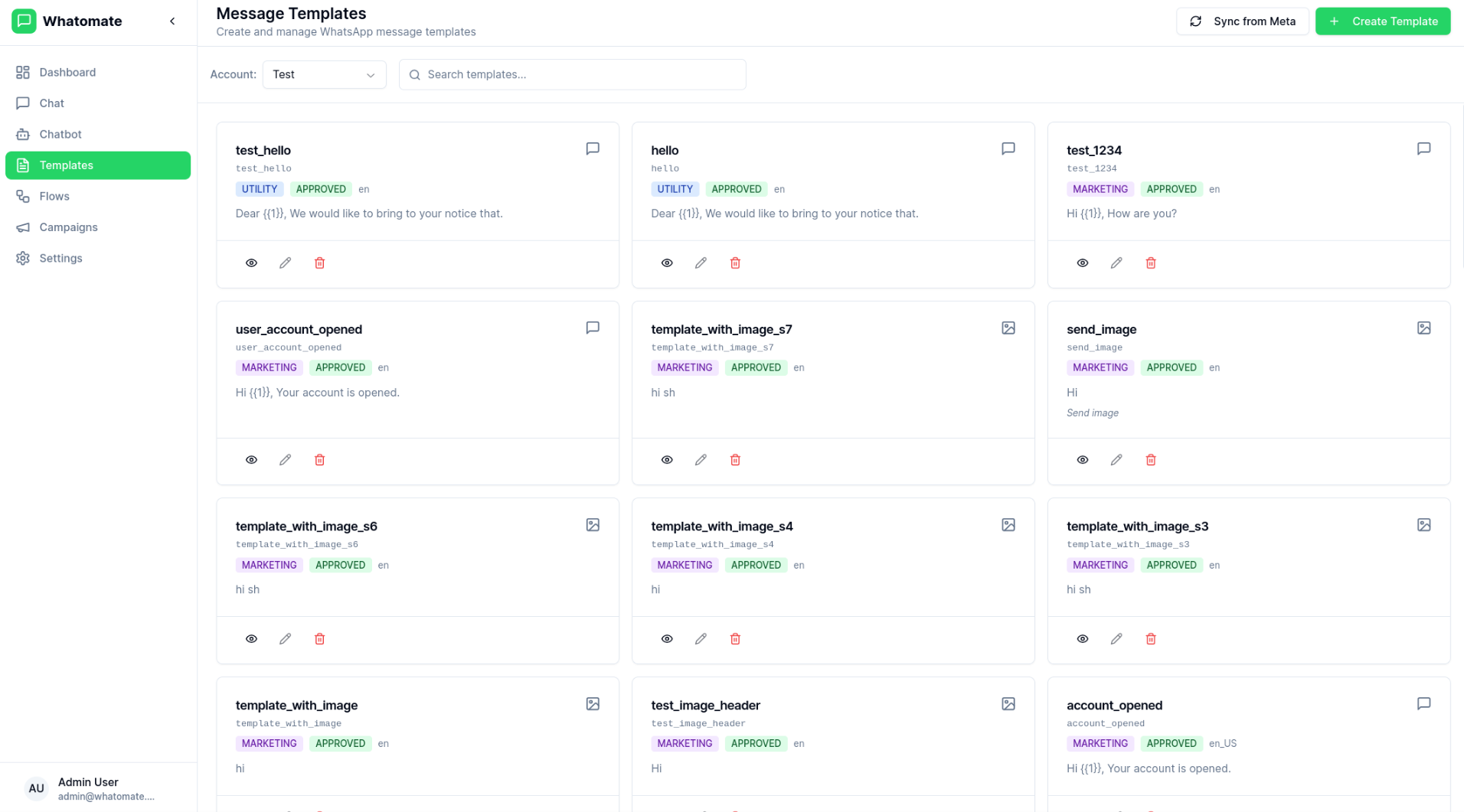
WhatsApp Message Templates are pre-approved message formats that allow businesses to send notifications and updates to customers. Whatomate makes it easy to manage, sync, and use templates across your organization.
The templates page displays all your synced templates from Meta's WhatsApp Business API, including:
Click the Sync from Meta button to fetch the latest templates from your WhatsApp Business Account. This ensures your local templates are always up to date with what's approved in Meta.
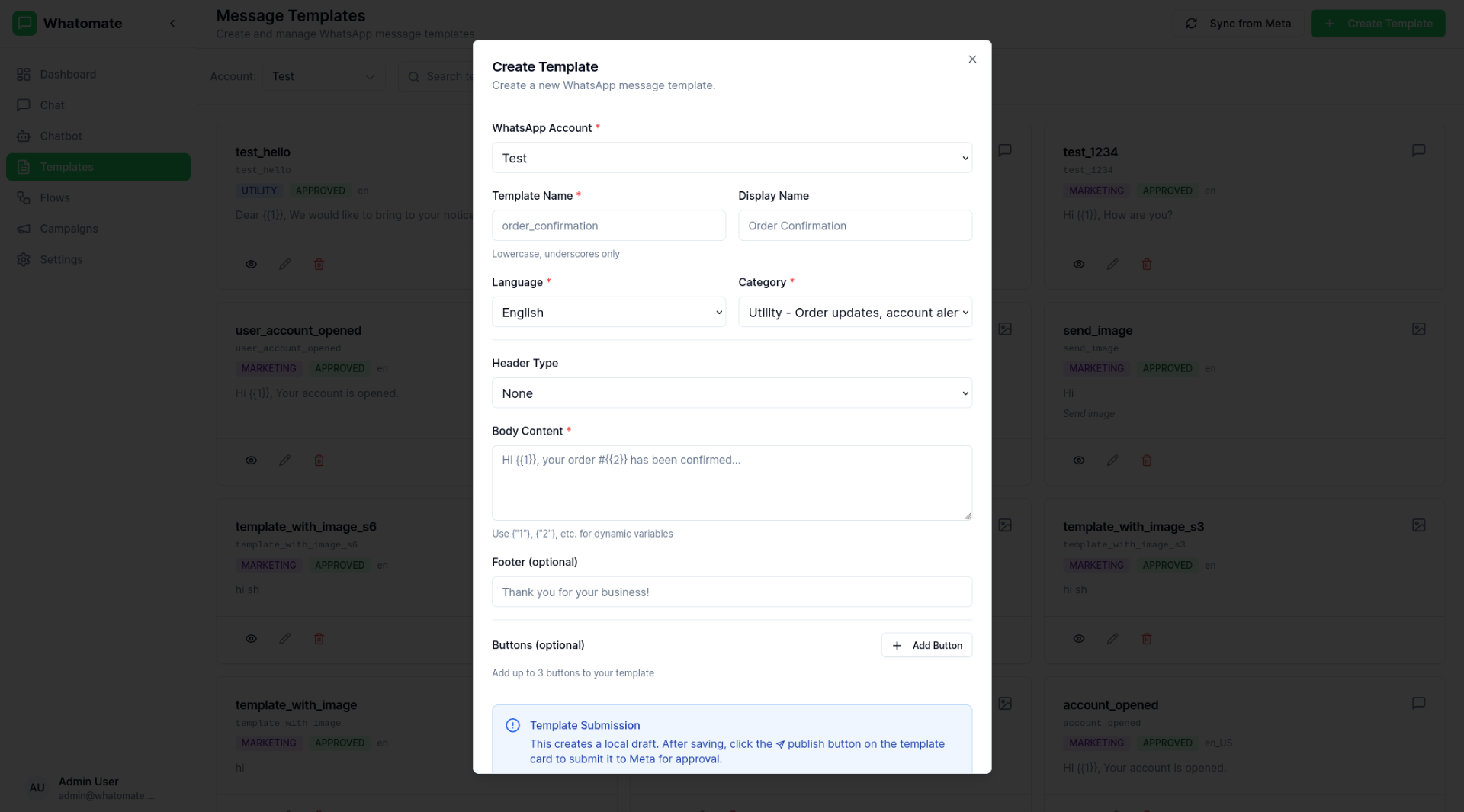
View and manage template details:
Templates with an IMAGE, VIDEO, or DOCUMENT header require a sample media file that Meta will review along with the template text. Without this sample, Meta will reject the template — and Whatomate enforces the same check before submission, so a template with a media header can't be saved or published until you've uploaded one.
Image, Video, or Document.4::aW1hZ2Uv…) — that's the reference Meta will use when reviewing.| Header type | Accepted formats | Max size |
|---|---|---|
| IMAGE | JPEG, PNG | 5 MB |
| VIDEO | MP4 | 16 MB |
| DOCUMENT | 100 MB |
The lifecycle of a template is Draft → Pending → Approved (or Rejected):
DRAFT. It is not visible to Meta yet, and cannot be used to send messages.PENDING.APPROVED or REJECTED on the next sync.DRAFT and REJECTED templates can be edited and republished. Approved templates are locked except for the body of MARKETING and UTILITY categories (Meta limits which fields are editable post-approval).If publish fails with "Template has IMAGE header but no media file has been uploaded", the upload either wasn't completed or wasn't saved — go back to step 4 of Uploading a sample.
Templates support dynamic variables that are replaced with actual values when sending messages.
The traditional format uses numbered placeholders {{1}}, {{2}}, etc.:
Hello {{1}}, your order #{{2}} has been shipped!When sending, you provide values in order:
{{1}} → Customer Name{{2}} → Order IDTemplates also support named parameters for better readability and maintainability:
Hello {{customer_name}}, your order #{{order_id}} has been shipped!Named parameters make templates easier to understand and less error-prone when dealing with multiple variables. When creating templates with named parameters:
{{customer_name}}, {{order_id}}, {{delivery_date}}A TEXT header can contain at most one variable — this is a Meta restriction
that Whatomate enforces at template creation time. Both positional ({{1}})
and named ({{season}}) work; mixing positional and named within the same
template (header + body) is still not allowed.
When sending:
header_params field on
Send Template Message. It
falls back to template_params if omitted — convenient for named templates
where the header variable name doesn't collide with a body variable.header column (always before the body parameter
columns) in your CSV or manual entry. The dialog can generate a sample CSV
with the right columns for you. See
Adding Recipients.Marketing
Promotional content, offers, and announcements
Utility
Order updates, confirmations, and notifications
Authentication
One-time passwords and verification codes
| Status | Description |
|---|---|
| Draft | Local-only draft; not yet submitted to Meta and can't be used to send |
| Approved | Template is ready to use |
| Pending | Awaiting Meta approval |
| Rejected | Template was rejected by Meta |
| Disabled | Template has been disabled |
Approved templates carry a quality rating reflecting how recipients have
engaged with them — Meta lowers it as customers block or report the template.
Whatomate stores this on each template and refreshes it on every Sync from
Meta. New templates start at UNKNOWN until Meta reports a score.
| Rating | Meaning |
|---|---|
| GREEN | High quality — low negative feedback |
| YELLOW | Medium quality — some negative feedback |
| RED | Low quality — high negative feedback; at risk of being paused by Meta |
| UNKNOWN | Meta hasn't reported a quality score yet |
Templates can include URL buttons with dynamic variables. For example, a "Track Order" button with URL https://example.com/track/{{1}} will prompt you to enter the dynamic URL value when sending the template from the chat view.
When sending via the API, provide button values using the button_params field. See the API reference for details.
Templates can be used in: